-
Yellow Layers
We are having trouble copy and pasting the symbol in ZVFN05 & ZKMC16
When we paste it into another layout we loose the yellow layer-it engraves it out instead of leaving the wood. What are the settings that will make it leave the wood in?
Kim Seavey
-
Administrator

RE: Yellow Layers
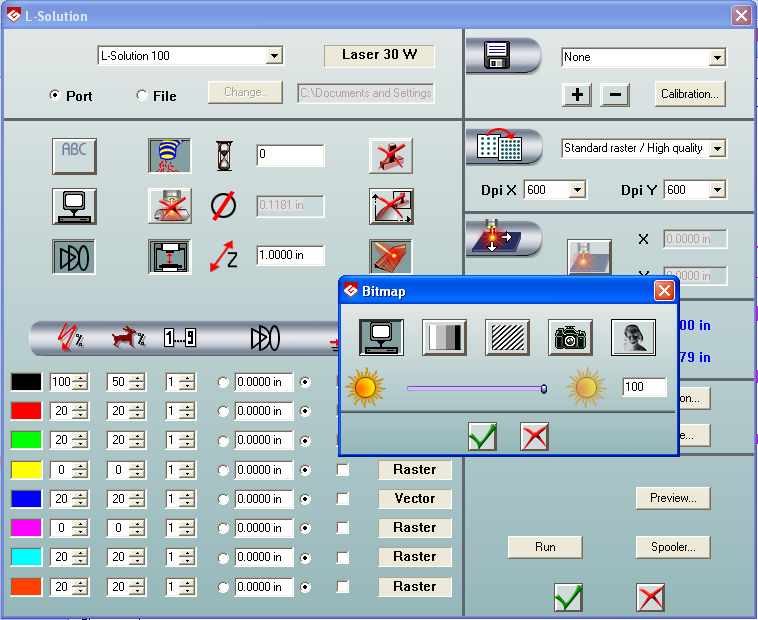
You need to change the "Marking" settings in the file where you paste into. This works in the original ZVFN05 & ZKMC16 files because the yellow "ink" is set to zero power and zero speed, telling the laser to just leave that yellow shaded area alone. The file that you're trying to run it on may have yellow set to be 20 power, 20 speed. Change the yellow in the Marking dialog to zero power, zero speed. Also, the "Bitmap" mode needs to be set to automatic (the computer icon) and the slider all the way to the right, showing 100 in the box. See the attached image. You should be able to leave the other settings alone.
-
thanks we figured out the yellow settings but not the bitmap settings so thank you
 Posting Permissions
- You may not post new threads
- You may not post replies
- You may not post attachments
- You may not edit your posts
-
Forum Rules


 Reply With Quote